Buttons & Menus
This page is the quick reference for the controls across the top of the ALB window.
Use these pages for the full operational meaning behind the controls:
- Planning Modes Overview
- EAT:LT Landing Timeline Planning
- EAT:AR Arrival Rate Fallback Planning
- Feeder View vs Runway View
Top buttons
FULL: reserved future compute-mode control. It remains disabled in the current release, so ALB runs inFULLmode andLEANcannot yet be selected.TL*/TL-: local timeline visibility.*means the timeline is shown;-means it is hidden.STAT*/STAT-: local statistics and arrival-planning-block visibility.*means shown;-means hidden.EATorPLT: changes what the compact combi field shows in the aircraft rows. It is a local display toggle and does not change the shared sequence logic.2 EAT,2 GL,2 SW, or2 ---: local hold-display setup for the compactglEatCombifield while an aircraft is still in hold and more than the threshold away from EAT.TXE*orTXE-: controls whether EAT-related policy is transmitted when you are the manual FMR. In normal operations, only the manual FMR can change this.EAT:AR,EAT:LT, and sometimesEAT:TF: selects the planning basis used for EAT.EAT:LTis the recommended modern operating modeEAT:ARis the rougher fallback methodEAT:TFis a separate target-fix mode when presentETA:ESorETA:ALB: selects whether the ETA basis follows EuroScope or the ALB calculation.HLW*orHLW-: is the active local permission for this ALB instance to write accepted hold timing back to the TopSky holding list.
Current UI note:
- recent ALB builds hide the visible
FPCtop-row button even though the underlyingFPCstate, peer sync, and logging behavior still exist
The title-bar order is now: FULL, TL, STAT, then the shared planning
controls, then the local display controls. Separators distinguish those groups;
the existing EAT/PLT and hold-combi display controls remain adjacent.
Timeline visibility and elevator
TL and STAT are local presentation controls. Click either button to show
or hide that area. They do not change ALB calculations, the selected planning
mode, aircraft state, FMR authority, or peer synchronization.
When TL- is active, ALB uses compact statistics-only or header-only
presentation. Manual resizing is unavailable until TL* is restored.
For each visible timeline, the vertical elevator at the right edge changes only the displayed future time window:
- drag the thumb to choose a future position
- click above or below the thumb to page
Page Upmoves further into the future;Page Downmoves back toward nowHomereturns to the current-time view;Endjumps to the furthest available future view
The elevator is not a sequencing or traffic-management control. Use aircraft
actions, PLR, and the normal FMR workflow for operational changes.
Local display buttons
The compact display buttons are local to your client. They do not change shared planning policy.
For the hold-display button:
- the number is the minutes before EAT where the display switches to countdown
EATmeans show EAT before that thresholdGLmeans show gain or lose before that thresholdSWmeans alternate gain or lose and EAT before that threshold---means stay blank before that threshold
Mouse actions:
- left-click decreases the threshold by 1 minute
- right-click increases the threshold by 1 minute
- double-click cycles the pre-threshold display mode
Example:
2 GLmeans show gain or lose while the aircraft is in hold and more than 2 minutes from EAT, then switch to countdown inside 2 minutes
Hold / EAT controls
HLWis the active operator-facing local write gate forHOLD_EAT.HLSis retained only as legacy or compatibility state and is no longer a normal visible top-row control.- In backend-primary healthy operation, canonical per-aircraft EAT comes from backend
SEQ/SET2+AC. - The final
/HOLD_EAT/HHMM/write is only the aircraft-visible local side effect of that canonical authority path. SEATremains available only as legacy, fallback, or compatibility hold-EAT handling. It is not the normal backend-primary transport.
Who can change these buttons
FULL,TL, andSTATare local presentation controls.FULLis disabled in the current release;TLandSTATare active local visibility toggles.EATorPLTis local display only- the hold-display button such as
2 EATor2 GLis local display only TXEis restricted to the manual FMRLayout,Timelines, and via-fix visibility are local display controlsEAT:AR/EAT:LT/EAT:TF,ETA:ES/ETA:ALB, legacyHLSpreference state, and underlyingFPCshared state are shared-planning controls and should normally be changed by the controller currently responsible for the shared planHLWis the active local write permission for the final localHOLD_EATpublication side effectPLRis a shared planning controlARis a shared planning control when the olderEAT:ARmethod is being used
When a manual FMR is active, ALB now enforces that more directly for several
shared controls. Non-FMR peers should expect shared PLR, AR, and scenario
edits to be ignored locally instead of quietly creating a competing plan.
See Collaboration & FMR for the authority rules behind that.
ETA and ELT naming
The top button uses ETA:ES and ETA:ALB, while some layouts may show row fields called ELT, ELT-ES, or ELT-ALB.
ETA:ESorELT-ESmeans the EuroScope or live estimate branchETA:ALBorELT-ALBmeans the ALB-calculated or corrected estimate branch
When ETA:ALB or ELT-ALB is selected, the ALB branch may use the configured orange timing model before terminal or post-via phases. Orange timing is ALB's configured route or STAR track-mile estimate toward touchdown. It is part of the ALB scheduling estimate, not a separate controller action.
Operator-facing rule of thumb:
- before the aircraft is deep into terminal or post-via handling, ALB can use its own corrected branch to give a more useful planning estimate
- that branch is built from the via-fix timing anchor plus configured orange distance-to-land, then turned into seconds using an ALB descent-speed model
- the current model uses a rough higher segment, a TMA segment, and a final segment; when flight-plan performance and upper-wind data are available, ALB can refine that estimate further
- if a near-via route-derived timing step is obviously implausible, ALB now guards the ALB branch instead of blindly cascading that bad timing into
ETA:ALB/ELT-ALB - once the aircraft is in terminal or post-via phases, ALB stops forcing a separate corrected landing estimate and follows the live EuroScope branch where appropriate
- peers should normally follow the FMR's selected ETA policy
For the detailed configuration side of that timing model, see Config File Reference.
Dropdown menus
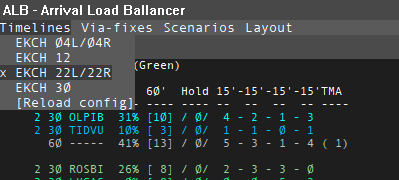
Timelines
Chooses which timeline definitions are active.
- You can select one or more timelines
- Timelines come from the ALB config
- They define destination airport coverage, streams, retained legacy scenario definitions, and default layout behavior
- The last menu entry,
[Reload config], re-readsalb-config.jsonwithout needing a restart - A successful reload preserves local runtime selections more cleanly than older builds and now also tries to keep the current timeline zoom
- If a restored timeline still depends on a configured legacy default AR or scenario baseline, reload now reapplies that configured baseline as part of the restored timeline state
Via-fixes
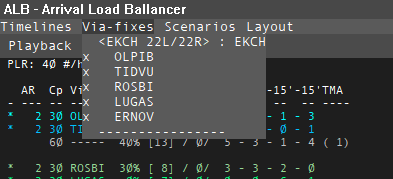
Lets you focus on the streams you care about.
- In some layouts, deselected streams remain visible but are dimmed
- In other layouts, deselected streams are hidden entirely
- The exact behavior depends on the selected layout and its
hideDeselectedViaFixessetting
See Feeder View vs Runway View for what that means operationally.
Scenarios
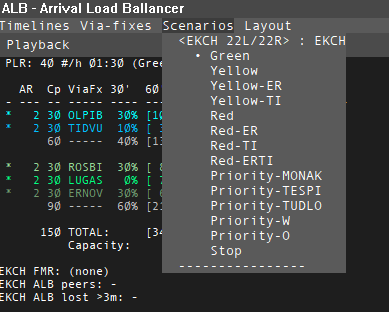
Recent ALB builds hide the visible Scenarios menu from the normal control
bar.
Operationally:
- It exists for compatibility and history
- It is not part of the recommended current operating method
- internal scenario config and apply logic still exist for compatibility
- In normal modern ALB use, the FMR works mainly through
EAT:LTmonitoring and correction instead of scenario switching
See Retired: Scenarios.
Peers
Shows an informational list of ALB peers for the active airport or airports.
- This menu is for awareness, not for actions
- It is the quick way to see whether another ALB instance is already coordinating the plan
- in current simplified control-bar layouts,
Peersappears immediately afterLayout - It can also show the peer's current EAT policy and ETA branch context in a compact form
Layout
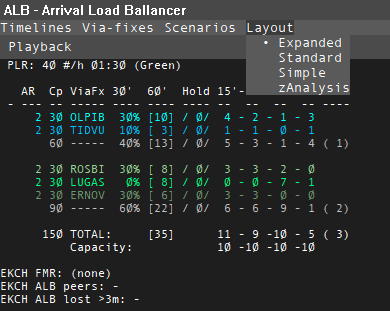
Changes how each aircraft row is displayed.
- Layouts come from config
- A layout can make ALB feel feeder-oriented or runway-oriented
- That view choice is independent of
EAT:ARversusEAT:LT - The available choices depend on the loaded config
See Feeder View vs Runway View for how layout changes the meaning of ordering and sequence actions.
Stats-area click actions
PLR: left-click decreases planned landing rate by 1. Right-click increases it by 1.AR: left-click decreases the stream interval by 1 minute. Right-click increases it by 1.
In EAT:LT, AR is not the active planning driver. Visible AR values are legacy/context information, and AR adjustment is not the normal control method.
For the operational difference between PLR and AR, see EAT:LT Landing Timeline Planning and EAT:AR Arrival Rate Fallback Planning.